01
Web workspace
Process videos, build research projects, ask across selected sources, and manage every integration from one place.
Video intelligence, across every screen
Turn YouTube videos into concise briefs and source-linked learning notes. Bring your lessons together in a searchable library, with Udemy lecture imports now in private preview.
 Learning on Udemy? Explore the private preview
Brief ready
13:51 video · 36 sec saved
Executive brief
Three characters compete for control: rational planning, instant gratification, and deadline-driven panic.
04:02
The monkey
07:08
Panic arrives
12:40
Life calendar
Ask this video or search your entire library…
Ready for
NotebookLM · Notion · Obsidian
01 · Capture
YouTube, uploads, channels
02 · Understand
Briefs, chapters, transcripts
03 · Ask
Answers with timestamp evidence
04 · Use
NotebookLM and your second brain
Tim Urban — Inside the Mind of a Master Procrastinator · TED2016 · Open on YouTube ↗
Tim Urban dissects procrastination via three characters in the brain — the Rational Decision-Maker, the Instant Gratification Monkey, and the Panic Monster — and argues the bigger problem isn't missing deadlines but the slow, invisible drift on goals that never had a deadline at all.
You asked:
When does the panic monster first show up?
Answer:
Tim introduces the panic monster at 07:08 as the third character — the one that finally scares the monkey off the wheel when a real deadline looms. He revisits it at 10:25 to explain why long-term goals never trigger it.
Udemy · Private preview
Use the VidBrief browser extension on a Udemy lecture to import its timed captions. Get a summary, key concepts, review questions, and links back to the original moments.
See how Udemy import worksPreview accounts only. Requires the desktop extension and access to the original course. Not all lectures expose supported captions.
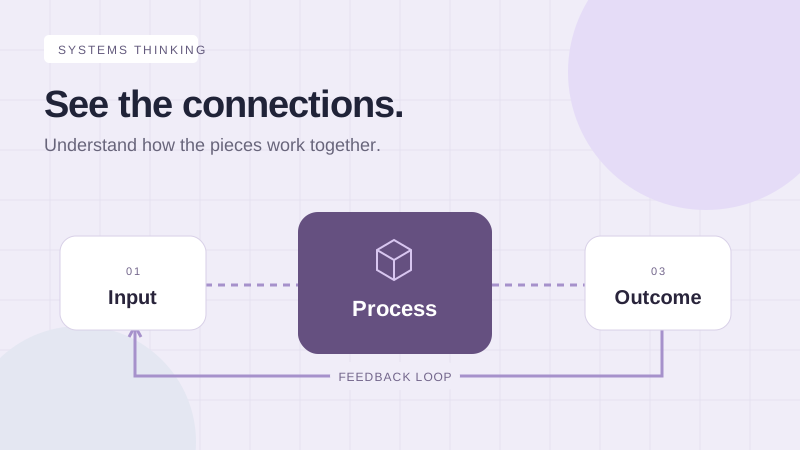
Learning notebook
A system uses the result of one cycle to adjust the next. Look for the loop, not just the individual parts.
Recall prompt · Where can you spot a feedback loop in your own work?
Your private learning workflow
Open subtitles and Transcript in Udemy, then choose Read this lecture in the extension.
Check the captions before agreeing to send them to VidBrief and its AI processors. Importing uses your existing allowance.
Keep your summary and learning notebook together. Timestamp links reopen the lecture in your own Udemy account.
No password sharing or video download. This preview does not include Udemy screenshots or bulk course imports.
Your video knowledge base
Search ideas across transcripts, compare arguments from different creators, and return to the original timestamp whenever an answer matters.
What do these videos agree on about AI agents?
Answer from 4 sources
They converge on a simple constraint: reliable agents need narrow goals, observable intermediate steps, and human approval for irreversible actions.
One library, every screen
Your account, usage, videos, and briefs stay connected across VidBrief surfaces.
01
Process videos, build research projects, ask across selected sources, and manage every integration from one place.
02
Add a video, read recent briefs, ask your library, and share enhanced sources while you are away from your desk.
03
Summarize the YouTube page you are watching. Preview accounts can also import supported Udemy lecture captions from the same extension.
Built for real research
VidBrief handles the work around the summary: capture, transcription, retrieval, organization, and export.
01
Use existing YouTube captions when available. VidBrief can process spoken videos without captions through audio transcription.
02
Follow selected channels, process new uploads, and receive keyword alerts through email or Discord.
03
Translate summaries, outlines, and transcripts when the source language is not the language you work in.
04
Export an enriched source with the brief, takeaways, timestamped outline, original URL, and transcript.
05
Send completed briefs to Notion, Obsidian, Markdown, or a reusable Google Doc.
06
See video and minute consumption before you hit a limit. Failed processing does not consume a successful-video allowance.
How it works
Processing continues in the background, so you can leave and return when the brief is ready.
Paste a YouTube URL, upload a file, or follow a channel.
We prepare the transcript, summary, takeaways, chapters, and search index.
Read, ask, verify timestamps, build a research project, or export to your knowledge stack.
Simple usage limits
Free
3 videos lifetime
Start a personal video library
Plus
50 videos / month
Channels, integrations, and Drive
Pro
150 videos / month
High-volume research and batch export
Your next saved hour starts here
VidBrief will turn it into something you can read, search, question, and use.